Smartphone Buying Guide 2026: How to Choose the Best Phone for You
Picture this: You’re scrolling through your feed, and suddenly, your phone lags on a simple app switch. Or worse, it dies mid-day during a video call. With tech moving so fast into 2026, picking the right smartphone feels like a maze. AI helps your camera snap pro-level shots, foldables bend like paper, and batteries last longer than ever. This guide cuts through the noise. We’ll walk you through steps to find the best phone for you, based on what you need and can spend. No fluff—just real tips to make your next buy a win.
Section 1: Defining Your Needs and Budget in 2026
Start here to avoid regrets. Think about how you use your phone every day. That sets the stage for everything else.
Assessing Your Primary Usage Profile
Who are you as a phone user? If you’re a power user or gamer, you crave top speed for heavy apps and smooth graphics. Look for phones with strong chips and at least 12GB of RAM to handle that without hiccups. Content creators need sharp cameras and editing tools built in, so prioritize devices with pro video modes and big storage.
Casual communicators just want reliable calls, texts, and social media. A mid-range phone with a decent screen and battery works fine for you. No need for extras that jack up the price. Business pros focus on security and work apps, so pick ones with fast updates and easy ties to your laptop or watch.
Here’s a quick breakdown:
- Gamer/Power User: High-refresh screens, cooling tech, and game boosters.
- Content Creator: Multi-lens cameras, color-accurate displays.
- Casual User: Basic but solid build, long battery.
- Business Pro: Secure logins, productivity suites like quick note-taking.
Match your habits to these, and you’ll skip phones that don’t fit.
Budget Tiers for Flagship, Mid-Range, and Value Phones
Money matters a lot in 2026. Phones split into clear groups: under $400 for basics, $400 to $750 for balanced picks, and over $750 for premium gear. Value phones shine if you skip fancy zooms but keep a strong processor—core speed affects daily tasks more than add-ons.
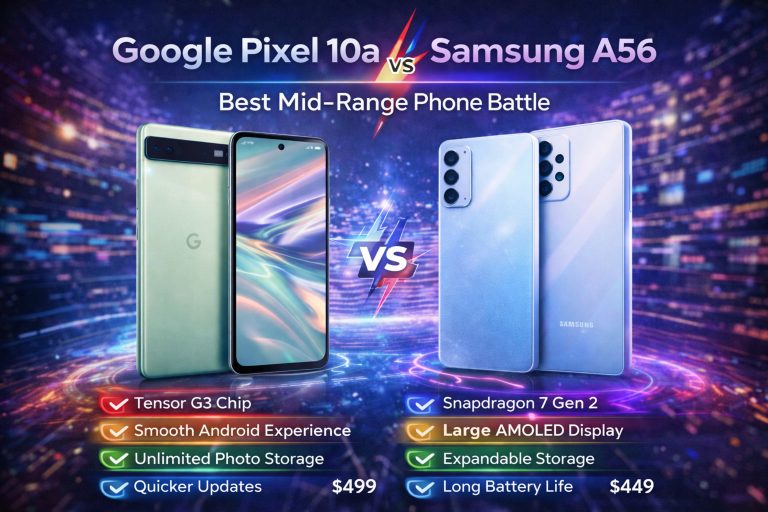
In the sub-$400 tier, expect good cameras and batteries, but displays might not hit 120Hz. Mid-range options, like those around $500, often match flagships in speed thanks to shared parts. Flagships over $750 bring extras like foldable screens or AI that predicts your next move.
Smart tip: Test battery life over camera perks if you’re on a budget. A phone that lasts all day beats one that snaps great pics but needs constant plugs. Check sales too—March deals can drop prices fast.
The Importance of Ecosystem Lock-in vs. Cross-Platform Flexibility
Do you stick to one brand’s world, or mix it up? iOS locks you into Apple’s gear, like seamless AirPods links or iPad handoffs. It’s smooth if you’re all-in, but switching costs extra. Android offers more choice, from Samsung’s watches to Google’s cloud sync.
Pros of lock-in: Everything just works together, saving time. Cons: You’re stuck if prices rise or features lag. Cross-platform means freedom—use a Pixel phone with a Windows PC via apps. Emerging OS like HarmonyOS from Huawei adds options for global users.
Ask yourself: Do you own other devices from the same maker? If yes, stay put for ease. If not, go flexible to avoid headaches later.
Section 2: Core Hardware Deep Dive: Processing Power and Performance
Hardware is the heart of your phone. Get this right, and everything runs smooth. Let’s break it down.
Decoding the 2026 Chipset Landscape (SoC Analysis)
Chips in 2026 pack AI smarts like never before. Think Snapdragon 8 Gen 4 or Apple’s A20— they handle tasks in seconds that took minutes last year. NPUs boost photo edits and voice commands without draining power.
Benchmarks show gains: New chips score 30% higher in multi-task tests than 2025 models. That means gaming without frames dropping or apps opening instantly. Real life? Stream 4K video while chatting, no sweat.
Pick based on needs—gamers want max GPU power, while casual folks need basic efficiency. Efficiency jumped too, with 3nm tech cutting heat and extending battery.
RAM and Storage Realities: Future-Proofing Your Device
RAM keeps things snappy. Aim for 8GB at minimum; 12GB or more for future-proofing against beefier apps. In 2026, low RAM means stutters on AI features like real-time translation.
Storage hits 256GB standard now, with UFS 4.0 speeds loading games in a blink. Expandable slots fade, but cloud storage fills the gap for most. If you hoard photos, go big—512GB avoids constant deletes.
Tip: Check how RAM handles background apps. A phone that juggles 20 tabs beats one that closes half.
Display Technology: Refresh Rates, Brightness, and Foldables
Screens got brighter and smoother. LTPO tech adjusts refresh from 1Hz to 120Hz, saving battery on static pages. Standard OLEDs work, but LTPO shines for outdoor use—up to 2,000 nits beats glare.
120Hz feels buttery for scrolls and videos; lower rates lag behind. Foldables like the Galaxy Z Fold 7 offer big canvases for work, but check creases and hinge strength. Durability improved with tougher glass, yet they’re pricier.
For you: Casual? 90Hz suffices. Creators? High brightness for editing in sun.
Section 3: Mastering Mobile Photography and Videography
Cameras steal the show in 2026. But it’s not just megapixels—smart tech rules.
Sensor Size and Pixel Binning: Beyond Megapixel Count
Big sensors grab more light, nailing night shots. A 1/1.3-inch sensor trumps 200MP tiny ones in dim rooms. Pixel binning merges dots for sharper, brighter pics without noise.
AI stacks shots to fix blur or boost colors. That’s why a 50MP phone with good software often beats higher counts. Test in real spots: Does it handle your kid’s soccer game at dusk?
Zoom Capabilities: Optical vs. Hybrid vs. Periscope Lenses
Optical zoom uses real lenses for clear far shots—no fuzzy crops. Hybrid mixes digital smarts for 10x without loss. Periscope designs, like in the iPhone 16 Pro Max, fold light for slim 5x optical.
Casual users: Hybrid at 3x works for vacations. Creators: Optical 5x+ for pro details, like wildlife close-ups. Samsung’s S25 Ultra nails 100x hybrids, but quality drops past 10x.
Choose by habit—if you snap concerts, skip basic digital.
Video Features for Content Creators (Log Profiles and Stabilization)
8K video is real now, but 4K at 60fps rules for smooth clips. Log profiles let you tweak colors later, like in pro cameras. IBIS steadies shaky hands during walks.
Frame rates hit 240fps for slow-mo fun. Top phones add mics for clear audio. If you vlog, seek 10-bit color and fast exports—saves hours in edits.
Section 4: Battery Life, Charging, and Longevity
Nothing kills a day like a dead phone. Focus here for peace.
Battery Capacity vs. Efficiency: The Real-World Endurance Test
5000mAh sounds big, but efficiency wins. A 3nm chip sips power, lasting 12+ hours on heavy use. Tests show some flagships hit 15 hours of mixed tasks.
Look at drain rates: Video streaming at 4 per hour? Solid. Tips: Hunt reviews with timed tests, not just claims. Match to your day—commuters need all-day juice.
Wired and Wireless Charging Speeds in 2026
Wired hits 120W, full charge in 20 minutes. Wireless at 50W matches, no cables needed. Safety tech prevents overheat, but use official chargers.
Packs like MagSafe evolved for faster pads. Convenience rules: Drop on a stand overnight, wake up full. Balance speed with battery health—limit to 80% daily.
Software Support Commitments and Device Lifespan
Updates keep phones fresh. Samsung promises 7 years of OS and security now; Google matches. That’s key for fixes and new features till 2033.
Short support means early trash. Check promises upfront—long ones add value. It boosts resale too, making your buy last.
Section 5: Security, Connectivity, and Essential Extras
These keep you safe and connected. Don’t overlook them.
Biometric Security: Face ID vs. Ultrasonic Fingerprint Scanners
Face ID scans in low light fast, but masks fool it sometimes. Ultrasonic prints work wet or oily, deeper than optical. Both secure, but prints edge out for speed—under a second.
iPhones stick to Face; Androids mix. Test in your life: Gym rats? Prints win.
The 6G Rollout and Wi-Fi Standards Impacting Performance
6G rolls out in spots by late 2026, promising gigabit speeds for downloads. Most phones support early bands. Wi-Fi 7 hits 46Gbps at home—great for 8K streams.
If you game online, seek Wi-Fi 7. It cuts lag big time.
Durability Ratings (IP Codes) and Build Materials
IP68 means dust-tight and 1.5m water for 30 minutes. New glass like Gorilla Glass Victus 3 resists drops up to 2m. Titanium frames add toughness without weight.
Ceramic options on Pixels shrug scratches. For active folks, high IP and strong builds prevent cracks.
Conclusion: Your Personalized Path to the Perfect Smartphone
Picking your 2026 phone boils down to needs, budget, and must-haves like chip speed, camera smarts, or battery endurance. Remember your user type from Section 1—it guides everything. The best phone fits you like a glove, not some hype machine.
We covered hardware wins, photo tricks, power plays, and security basics. Now, list your top three priorities and shop smart. With AI and folds leading the way, 2026 phones open wild doors. Grab yours and step into smoother days—your future self will thank you. Ready to upgrade? Hit the stores this March and own it.